Imagine you are a detective investigating a crime. You don't just find a clue and then forget about it. You follow a very specific process: you identify the crime, document your findings, assign the case to a fellow officer, and then confirm if the criminal has been caught. That's a lot like what we do with software bugs.
The Bug Life Cycle, also known as the Defect Life Cycle, is the systematic process a bug goes through during its entire existence. It’s the journey of a flaw in the software, from the moment a tester finds it to the moment a developer fixes it and the bug is officially closed. This cycle is a critical part of the software development process, ensuring that every bug is properly tracked, managed, and resolved.
Why Do We Need a Bug Life Cycle?
Why can't a tester just tell a developer, "Hey, I found a bug," and be done with it? Because a simple conversation is not enough. A formal, structured process is vital for several reasons:
Clarity and Accountability: It provides clear roles and responsibilities. Everyone knows who is doing what at each stage of a bug's life.
Efficiency: It prevents a bug from getting lost in the shuffle. A clear process ensures the bug gets the attention it needs.
Traceability: It creates a documented history of the bug. This is invaluable for later analysis and for understanding what caused the problem in the first place.
Communication: It standardizes how a bug is communicated from the testing team to the development team, eliminating misunderstandings.
Think of it as a workflow in a busy office. Without a process, a request might be passed from person to person without anyone truly taking ownership. The Bug Life Cycle ensures that a bug has an owner at every step.
The Many Lives of a Bug: A Detailed Look at Each Status
A bug isn't just "open" or "closed." It goes through a series of statuses that tell you exactly where it is in the resolution process. Understanding these statuses is key to mastering the bug life cycle.
1. New
This is the very first status a bug gets when a tester finds it. The bug is reported and entered into a bug tracking system, but it hasn't been reviewed or assigned to anyone yet. It’s a fresh piece of evidence waiting for a detective to pick up the case.
2. Assigned
A new bug has now been reviewed by a team lead or a project manager. They've assigned it to a specific developer to be fixed. The bug is now officially the developer's responsibility. The detective has been assigned the case.
3. Open
The developer has started working on the bug. They are actively analyzing the issue, writing new code, or changing existing code to fix the problem.
4. Fixed
The developer believes they have resolved the bug. They've completed their work and marked the bug as "Fixed." It's now ready to be sent back to the testing team for verification. The detective has made an arrest, and now a witness needs to confirm it.
5. Pending Retest
The bug has been fixed by the developer and is waiting for the tester to verify the fix. This status is a signal to the testing team that they can now retest the functionality to confirm the bug is no longer present.
6. Retest
The tester is actively retesting the fixed functionality. They're following the steps to reproduce the bug to confirm that the problem is indeed gone. The witness is now looking at the suspect to see if they are the one who committed the crime.
7. Verified
This is a great status to see! The tester has retested the functionality and confirmed that the bug is no longer present. The fix is working as intended. The witness has confirmed the suspect is the one, and the case is almost closed.
8. Closed
This is the end of the line for a bug. The tester has verified the fix, and the bug has been officially closed. It’s now part of the history of the project.
Special Statuses
Sometimes a bug doesn't follow a straightforward path. Here are a few other statuses you might encounter:
Rejected: The bug is not a bug. It might be a misunderstanding of the requirements, a duplicate of another bug, or something that is working as designed.
Deferred: The bug is a legitimate issue, but it's not a priority to fix right now. It will be scheduled for a future release.
Reopened: This is a tester's worst nightmare! A bug that was previously marked as "Fixed" or "Closed" has reappeared. The tester has found that the fix did not work, and the bug is back to being "Assigned" or "Open."
A Bug's Journey: A Step by Step Flow
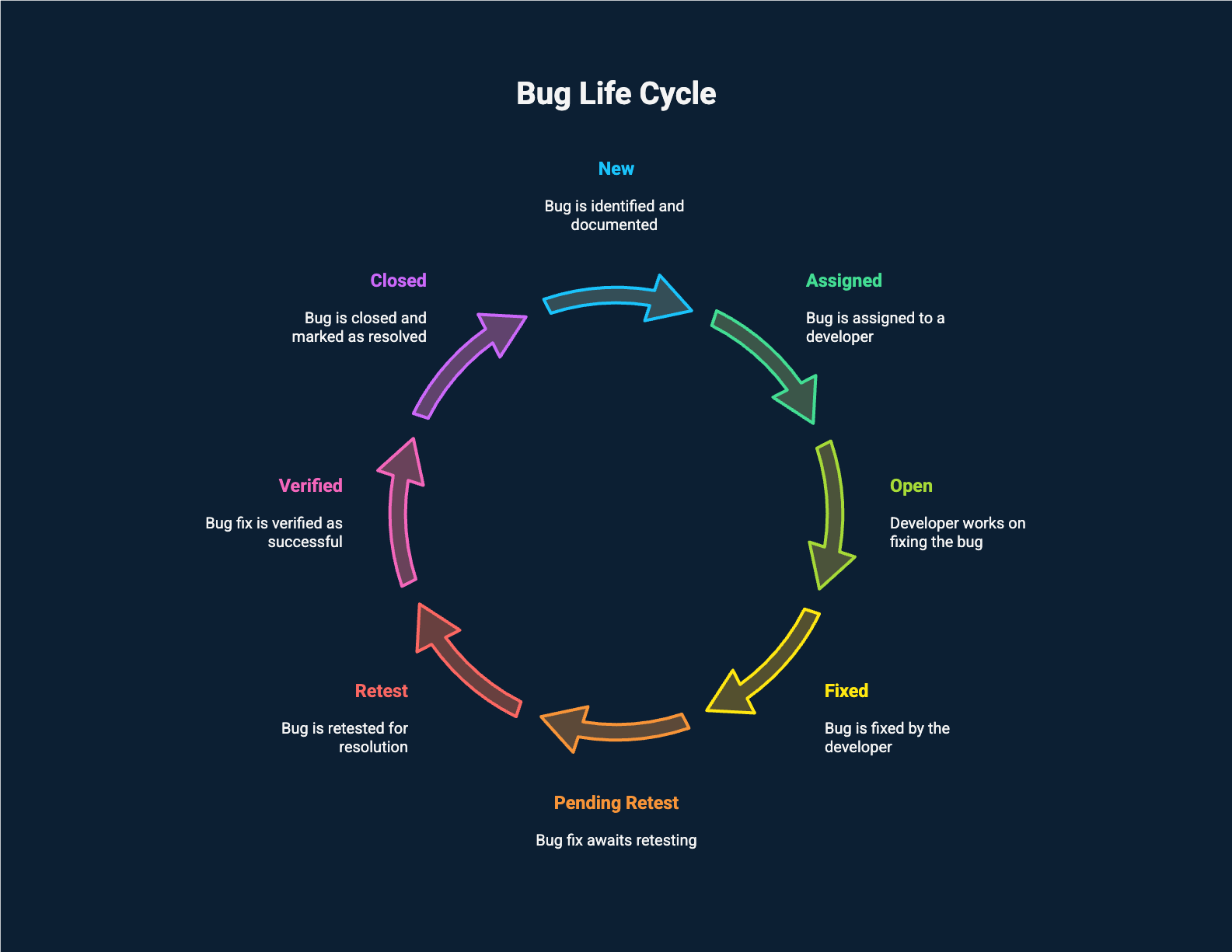
Licensed by Preparesh
Let's walk through the life of a bug using a simple example.
Scenario: We are building an e commerce website. A tester finds a bug where the website crashes when a user tries to add an item to their cart from the homepage.
New: The tester reports the bug, adds a detailed description, and a screenshot of the crash. The bug status is now "New."
Assigned: A project manager reviews the bug and assigns it to a developer named Sarah. The status changes to "Assigned."
Open: Sarah starts working on the bug. She finds the line of code causing the crash and writes a fix. The status is "Open."
Fixed: Sarah commits her changes and marks the bug as "Fixed." The bug is now waiting for the testing team.
Pending Retest: The testing team sees the bug is marked "Fixed" and schedules it for retesting.
Retest: A tester retests the functionality. They go to the homepage, find an item, and add it to the cart. It works perfectly! The website no longer crashes.
Verified: The tester verifies the fix and marks the bug as "Verified."
Closed: The project manager reviews the verified bug and officially closes it out. The case is now closed!
Who Does What? Roles and Responsibilities
The Bug Life Cycle is a collaboration between different roles on the team.
Tester: The first person to interact with a bug. Their job is to find the bug, report it, and then later verify the fix.
Project Manager or Team Lead: Responsible for reviewing new bugs, prioritizing them, and assigning them to the right developer.
Developer: Their main job is to analyze the bug, fix the problem, and communicate when the fix is ready for retesting.
Best Practices for a Smooth Cycle
A well defined Bug Life Cycle is a good start, but it's the practices that make it truly effective.
Write Clear Bug Reports: A good bug report is like a clear set of instructions for the developer. It should include a detailed title, a clear description, and easy to follow steps to reproduce the issue.
Prioritize Bugs: Not all bugs are created equal. Some bugs are critical and need to be fixed immediately, while others are minor and can be fixed later. Prioritizing bugs helps the team focus on what's most important.
Keep Communication Flowing: A bug tracker is a powerful tool, but it's not a replacement for communication. If a developer is having trouble reproducing a bug, they should reach out to the tester for more information.
The Bug Life Cycle is more than just a set of statuses; it's a way of working together to create a high quality product. By understanding and embracing this cycle, you'll be well equipped to handle any software mystery that comes your way.