Imagine you are a detective, and your case file is a new software application. As you investigate, you find various clues, which in our world, are software defects or bugs. Now, your job is to figure out which clues are the most dangerous and which ones need your immediate attention. This is exactly the challenge faced by every software development team. Two key terms help them with this crucial task: Severity and Priority.
At first glance, they might seem interchangeable, but they are as different as night and day. Understanding this distinction isn't just about using the right jargon; it's about making smart, strategic decisions that save time, money, and most importantly, prevent major user headaches. Let’s dive deep into this fascinating world and unravel the mystery of bug classification.
Licensed by Preparesh
What's the Big Deal? A Tale of Two Bugs
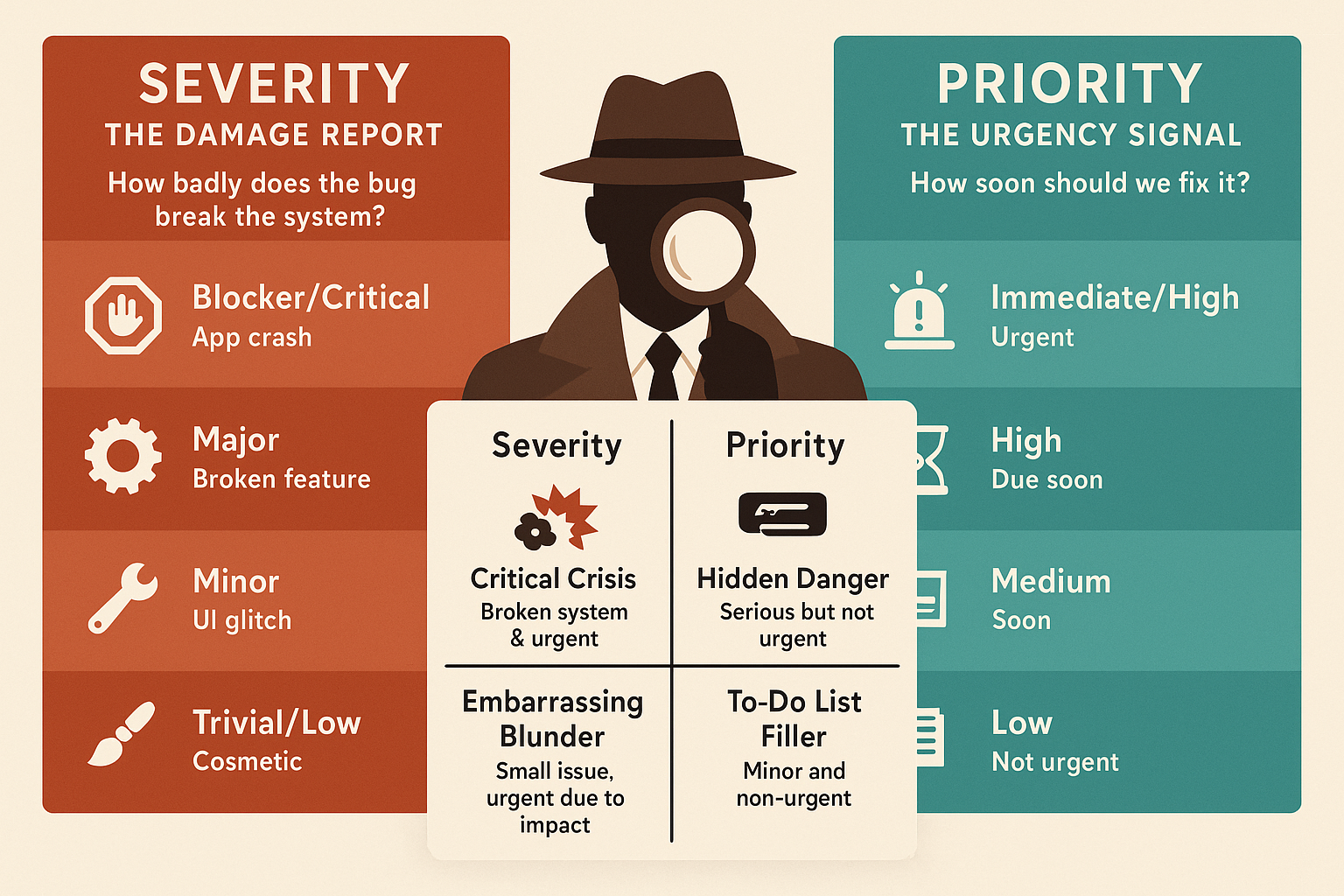
Think of it this way: Severity is all about the impact of the bug. It's an internal measure of how badly the bug messes up the system. Priority, on the other hand, is about the urgency to fix it. It’s an external measure of how soon this fix needs to be released to users.
Let's use a fun analogy. Imagine a bustling restaurant kitchen. The Severity of a problem is like a broken oven. It’s a huge deal. It stops the chefs from cooking food. The Priority is like a minor stain on a plate in an empty restaurant. It’s a low priority because no one is there to see it. But if the stain is on the plate of a food critic who is about to write a review, the Priority skyrockets! The problem itself (the stain) didn't get worse (its severity is still low), but the need to fix it immediately changed everything. This is the core difference we need to remember.
Let’s break down each concept in detail.
Severity: The Impact Report
Severity is a technical parameter assigned by the tester or quality assurance (QA) engineer. It focuses solely on the damage a defect causes to the system’s functionality. How bad is the damage? That’s what severity answers.
Think of it like a medical diagnosis for your software. Is it a minor paper cut or a major heart attack?
We typically classify severity into four levels:
1. Blocker or Critical
This is the heart attack. A blocker defect means the system is completely down or a major feature is totally unusable. There is no workaround. It's a showstopper.
- Example: Imagine a banking app. A critical defect would be one that prevents users from logging in at all. The entire purpose of the app is lost.
2. Major
This is a serious issue, but not a total disaster. A major defect affects a core function of the application, but a workaround or an alternate path might exist. The system is partially usable.
- Example: In the same banking app, a major defect might be that users can log in, but the feature to transfer money to another account is broken. Other features still work, but a key function is gone.
3. Minor
This is the paper cut. A minor defect affects some minor functionality or a non core part of the system. It’s annoying but doesn't stop the user from using the application effectively.
- Example: A minor defect could be a typo in the terms and conditions or a slight misalignment of a button on a less frequently used page. It’s not a good look, but it doesn't break anything.
4. Trivial or Low
This is the equivalent of a scratch on your phone screen. A trivial defect is a cosmetic issue or a very small UI/UX flaw that barely affects the user experience.
- Example: A trivial defect might be an inconsistent font size between two similar paragraphs on a help page.
Key Takeaway: Severity is all about the "what." What is the extent of the damage this bug is causing? It is a constant value for the bug, independent of who finds it or when it is found.
Priority: The Urgency Signal
Priority is a business parameter. It is a measure of how quickly a defect needs to be fixed and released to users. It’s assigned by a product manager or project manager, often in consultation with the development and QA teams.
Think of priority as a to do list. What's at the top? What can wait until tomorrow? Priority depends on many factors, including the bug's visibility to users, its impact on revenue, and its effect on business goals.
We typically classify priority into four levels, which often mirror the severity levels but are not the same thing.
1. Immediate or High
This bug needs to be fixed and deployed immediately. It is often a critical or major severity bug that affects many users or is a significant business risk.
- Example: A high priority bug is a security vulnerability that could expose user data. It might be a low severity bug in terms of functionality, but the business risk makes it a top priority.
2. High
This defect needs to be fixed in the next release or sprint. It's important and affects key functionality, but it's not a complete crisis.
- Example: A major bug where the money transfer feature is broken. It is a high priority because it affects a core function, and users will be upset if it’s not fixed soon.
3. Medium
This is a non critical defect that can be fixed in a future release. It’s on the list, but other more important tasks are ahead of it.
- Example: A minor bug with the button alignment on a page. It's a medium priority because it's good to fix for a polished look, but it can wait for a later release.
4. Low
This is a cosmetic issue that can be addressed when time permits. It’s not urgent and can be put on the back burner.
- Example: The trivial bug with inconsistent font size. It's a low priority because it doesn't impact user experience in any significant way.
Key Takeaway: Priority is all about the "when." When should we fix this bug? It's a dynamic value that can change based on business needs and user feedback.
The Quadrant of Confusion: Severity vs. Priority Matrix
This is where the magic happens. A bug’s severity and priority can be completely independent of each other. This is the most crucial part of our discussion. Let’s look at the four possible combinations, or quadrants, of severity and priority.
1. High Severity, High Priority (The Critical Crisis)
This is the worst case scenario. The bug is a catastrophic failure and must be fixed immediately. It's a core functionality that is broken, and it's affecting a large number of users.
- Example: The login button on a popular e-commerce site is completely broken. Users can't access their accounts or place orders. This is a business emergency.
2. High Severity, Low Priority (The Hidden Danger)
This is an interesting one. The bug is a serious technical issue, but it doesn't need to be fixed right away. This can happen if the bug affects a feature that hasn't been released to the public yet or a feature that is rarely used.
- Example: A major bug is found in a report generation module that only runs once a month for a specific internal team. The bug causes the report to crash. Since the next report run is weeks away, the priority to fix it is low, even though the severity is high.
3. Low Severity, High Priority (The Embarrassing Blunder)
This is the food critic on an empty restaurant analogy. The defect itself isn’t a major technical issue, but it needs to be fixed immediately due to business or reputational risk.
- Example: A typo in the company's name or a major spelling mistake on the homepage of their website. Technically, it’s a trivial defect, but the brand damage it could cause makes it a high priority to fix.
4. Low Severity, Low Priority (The To-Do List Filler)
These are the minor, cosmetic bugs that don't need immediate attention. They can be fixed when there's spare time or bundled with other non critical changes in a future release.
- Example: An inconsistent color scheme for a button in a corner of the website that very few users ever see. The impact is minimal, and the urgency is non existent.
Conclusion: Why Does This Matter?
Understanding the difference between severity and priority is a superpower for a developer, a tester, or a product manager. It helps teams make rational decisions instead of emotional ones. It ensures that critical, user impacting issues are addressed first, while less urgent but perhaps technically complex bugs are handled in due time.
This knowledge transforms bug reporting from a simple list of problems into a strategic roadmap for a better product. It’s about being smart, not just busy. So the next time you find a bug, don’t just ask, “How bad is it?” Also ask, “How soon do we need to fix it?” That’s the key to becoming a true bug detective and building exceptional software.