Welcome, future security wizards! Ever wonder what keeps your online data safe from prying eyes and sneaky changes? We’re about to pull back the curtain and dive into the magical world of information security. Think of this as your secret spellbook for protecting digital treasures. It's not just for security experts; understanding these core ideas is a superpower for any engineer.
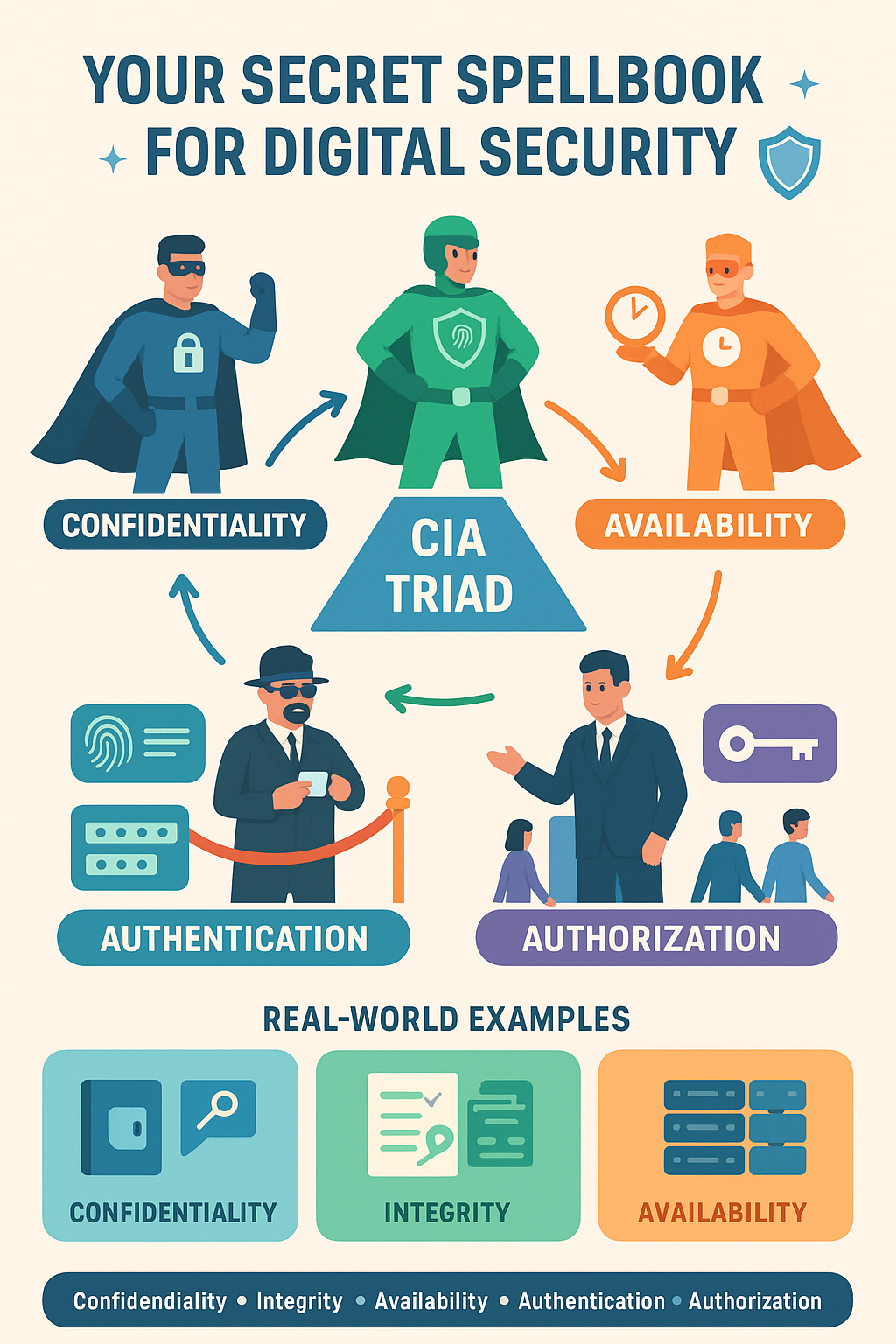
Let's begin our adventure by meeting the three most important guardians of security: Confidentiality, Integrity, and Availability. These three principles are so vital they have their own special club, known as the CIA Triad. No, not the government agency! This one is much cooler and way more relevant to your daily work.
Licensed by Preparesh
The CIA Triad: Our Three Security Superheroes
1. Confidentiality: The Art of Keeping Secrets
Imagine you're writing a super secret love letter. You want to make sure only the intended recipient can read it. You definitely don’t want your nosy sibling or a random stranger to peek at your heartfelt words. Confidentiality is exactly that: ensuring that information is accessible only to those who are authorized to see it. It’s all about protecting secrets.
How do we achieve this? Think about a locked diary. You have the key and only you can open it. In the digital world, we use encryption to lock up our data. Encryption takes our normal, readable information (plain text) and scrambles it into an unreadable mess (cipher text) using a special key. Without the key, it’s just gibberish.
Example Time! Let’s say you’re logging into your favorite online store. When you type in your password, it doesn't travel across the internet in plain text for everyone to see. Instead, your browser encrypts it into a jumbled code. The online store’s server has the key to decrypt that code, confirming that you are who you say you are. This ensures your password remains a secret, protecting its confidentiality.
Another great example is a private photo album. You set the permissions so that only your family and close friends can view the pictures. Unauthorized people, like your creepy neighbor, can’t see them. This is confidentiality in action, controlling who gets to see what.
2. Integrity: The Trustworthy Guardian
Now, let's go back to our secret love letter. What if someone got a hold of it and changed the words to something embarrassing before it reached your crush? You'd be mortified! Integrity is the principle that protects information from being altered or corrupted by unauthorized parties. It's about ensuring the data remains accurate and trustworthy.
Integrity asks a simple question: "Is this data exactly as it was meant to be, or has someone messed with it?"
How do we achieve this? We use clever techniques like hashing and digital signatures. Imagine a hash as a unique fingerprint for a piece of data. If even a single character in the data changes, its fingerprint changes completely.
Let's say you download a software update. The company provides a checksum or hash value alongside the download link. After you download the file, your computer calculates its hash value and compares it to the one the company provided. If the two values match, you know the file is the real deal and hasn't been tampered with. If they don’t match, it means something is wrong: the file could be corrupt or, even worse, a malicious actor might have replaced it with a virus. Integrity saved the day!
Integrity is critical for things like financial transactions. When you transfer money online, you need to be absolutely certain that the amount you typed is the amount that gets moved. A bank's systems must have strong integrity controls to prevent unauthorized changes to account balances.
3. Availability: The Ever-Present Helper
Our final superhero in the triad is Availability. This one is all about making sure that your data and services are always there when you need them. Think of it as the ultimate reliable friend who always shows up. When you go to log into your email, you expect it to be there. You'd be pretty frustrated if the server was down and you couldn't access your messages.
Availability ensures that authorized users can access the information and resources they need, whenever they need them.
What threatens availability? The biggest threat to availability is a Denial of Service (DoS) attack. This is like a massive crowd trying to get into a small concert venue, blocking the real ticket holders from entering. A DoS attack floods a server with so much traffic that legitimate users can’t get through.
To ensure availability, organizations use a variety of strategies:
Redundancy: They might have multiple servers running the same service, so if one fails, another can take over. Think of a spare tire for your car.
Backups: Regularly backing up data ensures that if a system crashes or data is lost, it can be quickly restored.
Load balancing: Distributing traffic across multiple servers prevents a single server from getting overloaded.
Think about the emergency services website for a city. During a natural disaster, it's absolutely crucial that the site is available so people can get important information. This is a real world example where availability is a matter of life and death.
The Dynamic Duo: Authentication and Authorization
Now that we’ve met the CIA triad, let's introduce two more security superstars who work hand in hand to protect our systems: Authentication and Authorization. These two are often confused, but they have very distinct jobs.
Authentication: The Identity Check
Authentication is the process of verifying who you are. It’s the digital equivalent of a bouncer checking your ID at a club. It answers the question, "Are you really who you say you are?"
The most common form of authentication is a password. You provide your username (which is your declared identity) and your password (the secret you know that proves your identity). The system checks if the password matches the one stored for that username. If it does, you're in!
But passwords can be weak. So, many systems use Multi-Factor Authentication (MFA). This is like needing two or more forms of ID to get into a super exclusive club.
Something you know (like a password).
Something you have (like a one time code sent to your phone).
Something you are (like your fingerprint or a face scan).
MFA makes it much, much harder for unauthorized people to get in, even if they somehow steal your password.
Authorization: The Permission Granting
Once you’re authenticated (the bouncer let you in), authorization decides what you are allowed to do and see. It's the club manager saying, "You're a VIP, so you can go into the exclusive lounge. But you're a regular guest, so you can only stay on the main dance floor."
Authorization determines your level of access and what actions you can perform.
Example Time! Think about a work project management tool. When you log in (authentication), the system then checks your permissions (authorization).
As a project manager, you might be authorized to create new tasks, assign them to people, and delete the project entirely.
As a junior team member, you might be authorized to view and update your own tasks, but you can’t delete the project or assign tasks to others.
This separation of duties is a core principle of good security. It ensures that people only have access to what they absolutely need to do their jobs, a concept known as the Principle of Least Privilege.
Putting It All Together
Let's review our journey with a practical scenario.
Imagine you're building a new mobile app for a doctor's office.
Confidentiality: You need to protect patient data. You'll use encryption to ensure that medical records are unreadable to anyone who doesn’t have the proper authorization and keys.
Integrity: When a doctor updates a patient’s file, you must ensure that the data is not corrupted and that no one can maliciously alter it. You’ll use techniques like digital signatures to verify the data's authenticity.
Availability: The doctors and nurses need constant access to patient records, especially in an emergency. You'll use redundant servers and reliable backups to make sure the system is always online and accessible.
Authentication: A nurse logs into the app using their username and a strong password, perhaps with a second factor like a fingerprint scan. This process confirms their identity.
Authorization: Once logged in, the nurse is authorized to view and update patient charts for their specific shift, but they are not authorized to access the hospital's financial records or a different department’s patient files.
By keeping these fundamental concepts in mind, you can build systems that are robust, trustworthy, and secure. They're not just abstract ideas; they are the bedrock of everything we do in the digital world. So, go forth and build with confidence, knowing you have the tools to create a safe and secure digital environment! 🚀